Get started

Start automating your chats with dibales.ai today

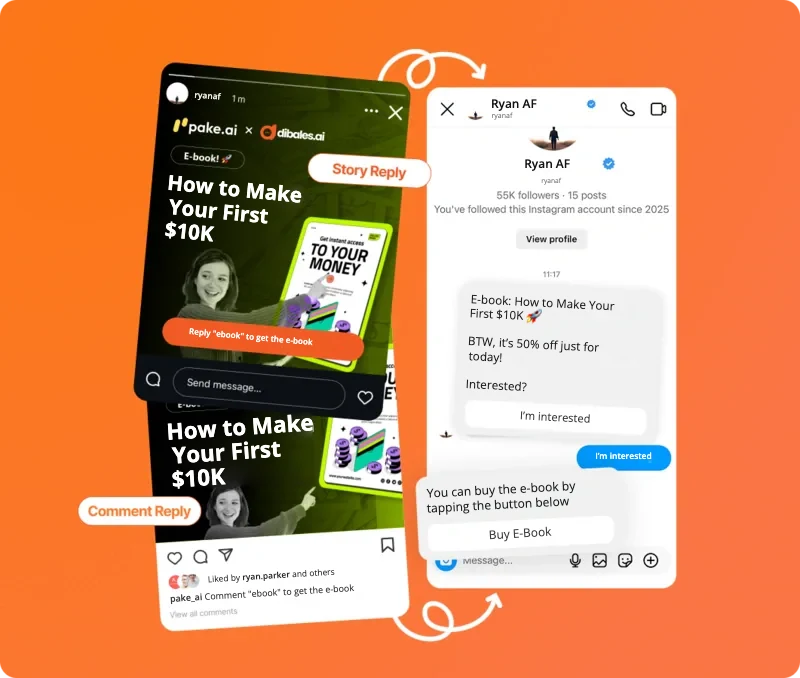
Story Reply and Comment Reply examples that send an e-book link by DM automatically

Social Media Scheduler

Schedule ContentAcross Platforms

Create your content once and it goes out to Instagram, TikTok, YouTube and more, right on schedule. No more posting one by one.

Trusted by 13,000+ creators & brands across Asia

Platforms

One Post, Seen on 7 Platforms

  • Instagram

    Feed and Stories

    Add Comment to DM in the same step
  • Facebook

    Feed, Reels and Stories

    Straight to your Facebook business Page
  • Threads

    Text, photos and videos

    Great for quick updates and conversations
  • TikTok

    Videos and photos

    Add Comment to DM in the same step
  • YouTube

    Videos

    Keep your channel posting, even on busy weeks
  • LinkedIn

    Text, photos and videos

    Great for building your personal brand
  • Pinterest

    Photo & video Pins

    Send people to your product link
  • Comment to DM Built In

    On Instagram and TikTok, set up the automation while you create the post.

    See how

Automation From the Post

Comment to DM Goes Live With Your Post

No need to wait for a post to go live before you set up automation. Add the keyword and the DM while you create the post, and the automation switches on the moment it's published.

  • Anyone who comments your keyword gets a DM, on Instagram and TikTok
  • Instagram Stories: everyone who replies gets a DM
  • Reply to the comment publicly at the same time
  • Add a link button to Instagram DMs

Scheduler Features

Plan Your Month From One Calendar

Every Post on One CalendarCalendar & List

See everything that's out and coming up, day by day, so empty days are easy to spot.

A Caption That Fits Each Platform

Use the same caption everywhere or tailor it to each platform's audience. Your call.

Preview Before It Goes Out

See how it looks on each platform first, so it goes out exactly the way you want.

Plan Months Ahead

Schedule up to three months of content in one sitting.

Save It as a Draft

Not sure about the time yet? Save a draft and pick it up whenever you're ready.

Know What's Live

See what's live on each account. If something fails, just reschedule it.

How It Works

Get Started in 3 Steps

  1. 1

    Connect your accounts

    Connect Instagram, Facebook, Threads, TikTok, YouTube, LinkedIn or Pinterest. Each account only needs connecting once.

  2. 2

    Create the post

    Add your photo or video, write the caption and pick where it should go.

  3. 3

    Set the time

    Pick the date and time. The rest runs on its own, and you can follow it on the calendar.

Social Media Scheduler FAQ

Which plans include the scheduler?

The social media scheduler is included in the Plus and Pro plans. See what each plan includes on the Pricing page.

Which platforms can I post to?

Instagram, Facebook, Threads, TikTok, YouTube, LinkedIn and Pinterest. Instagram needs a business or creator account, and Facebook posts go to a Page.

Can it post straight to TikTok?

Yes. Your content goes live on TikTok on schedule. If you'd rather edit it in the TikTok app first, send it to your TikTok inbox instead.

What happens if a post fails to publish?

The calendar shows it if something fails, and you can simply reschedule it.

Which time zone does the scheduler use?

Times are set in WIB (Western Indonesia Time, UTC+7), so pick your posting times in WIB.

Included in Plus and Pro

Start Scheduling Your Posts

Join 13,000+ creators & brands across Asia

Get Started